|
|
Model Railroad Electronics and Control |


A-Track for Windows (A-Track) is a powerful FREE extension to complement the facilities of your NCE Corporation Power Cab or Power Pro Digital Command Control system and to assist you in organising and running your roster of locomotives on your model railroad.
No need to be a computer expert
A-Track stores full details of all of your locomotive and accessory (turnout) decoders
-
Easy access to all DCC configuration parameters on your personal computer screen
A-Track can back-up all of the data held within each DCC decoder in your roster
A-Track stores full details of all of your locomotive and accessory (turnout) decoders
Safeguards all the hours of effort put in by you (or your Club’s DCC expert) in programming and configuration
No change in how your NCE Command Station and Handheld Cabs operate
-
Use them exactly as before
A-Track lends a powerful helping hand in the background
A-Track runs under Windows XP, Windows Vista, Windows 7, Windows 8 (including 8.1), Windows 10 or Windows 11 on a standard Personal Computer (PC)
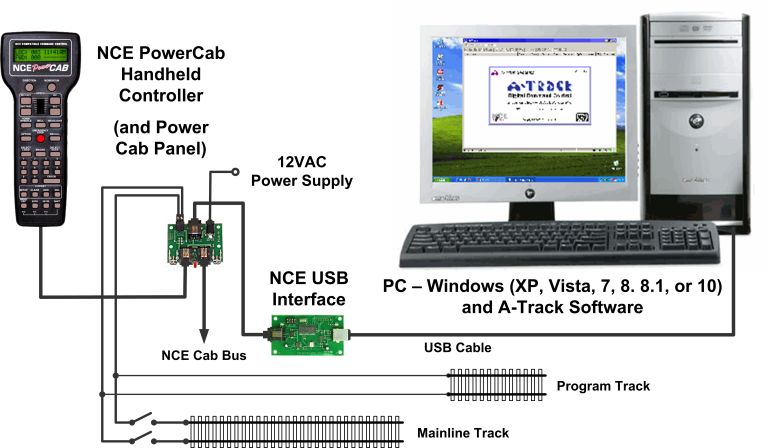
Using an NCE Power Cab system (including systems based around an NCE SB3a or SB5 Smart Booster unit, or the entry-level DCC Twin), A-Track connects via an NCE USB Interface unit, as shown in the example set-up below for a Power Cab system -
|
|


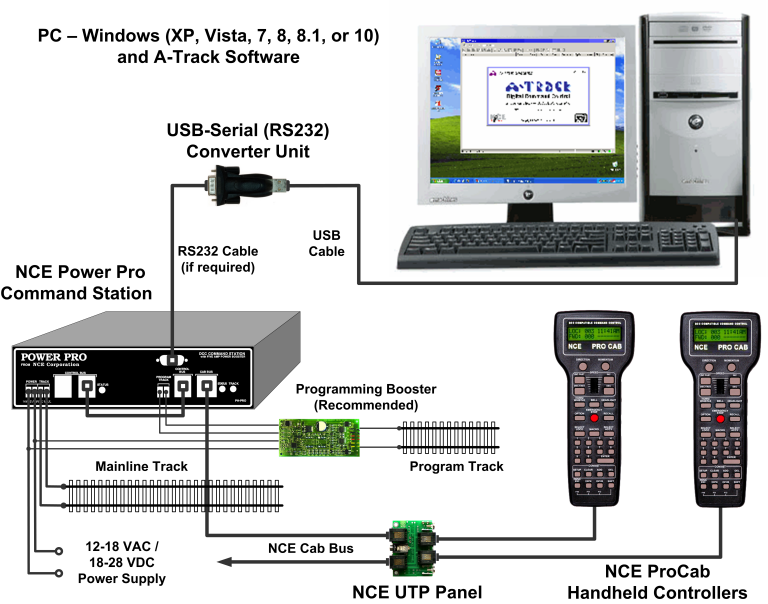
Alternatively, with an NCE Power Pro Command Station, A-Track connects via a standard Serial Port, if you have an older PC which is fitted with one, or via a USB Port and any readily-available USB-to-Serial (RS232) converter unit, as shown below -
When used with either an NCE Power Pro, a Power Cab or Smart Booster Version 1.65 system, or a DCC Twin (and a Version 7 USB Interface where appropriate), A Track will also let you monitor, set up, save, and restore the complete status and operational parameters of the NCE Command Station and all attached Cabs from your PC
No need to set everything up from scratch at the start of a session – more time to enjoy your model railroading
If using a DCC Twin, A-Track lets you perform these functions instead of having to purchase an NCE ProCab for the purpose
Note, however, that these set-up facilities are not available when A-Track is used with the earlier Version 1.28 of the NCE Power Cab and Smart Booster systems, or with a Version 6 USB Interface.
|
|
Safeguard Your DCC Decoder Configurations
Using A-Track, you can -
Read and save the status and parameters of each new locomotive decoder as delivered by the manufacturer
See the complete configuration details of the locomotive at a glance, on the PC screen, rather than only one parameter at a time by using a standard handheld Cab
Handle all types of decoders, including sound decoders, from all manufacturers who comply with National Model Railroad Association (NMRA) DCC standards. A-Track has been successfully tested with Bachmann, Broadway Limited (Paragon 2/3), DCC Concepts, Digitrax, ESU (LokSound), Hornby, Lenz, NCE, Model Rectifier, MTH, QSI (Quantum), SoundTraxx, Tam Valley Depot, Train Control Systems (TCS), Zimo, and ZTC decoders
Make changes to the decoder parameters directly on the PC screen, without having to compute or type in complicated numerical values, and immediately try out the effects to see whether to keep the alterations or go back to the original values
Keep back-up copies of each decoder’s settings – especially valuable if you make an error in programming one or more parameters, and completely upset your careful tailoring of a locomotive’s performance and characteristics. A-Track lets you to retrieve the previous decoder set-up and restore the locomotive to its previous state (as long as you remembered to save the earlier version before making the changes !)
Look at the decoder set-ups for several locomotives at the same time, see the differences between them, then tune their speed (and function) characteristics to run together in a consist
Copy decoder parameters from one locomotive to another – very useful when you purchase a new locomotive similar to one already in your roster, saving a lot of programming time and effort – just make sure you use A-Track first to make a back-up copy of the original settings in the new locomotive (just in case !). Then give the new locomotive an appropriate description and its own DCC address, plus any minor enhancements that you might want to make
|
|
Control and Monitor Your Layout
As well as handling locomotive decoders, A-Track also lets you program and operate accessory (or stationary) decoders, primarily to control turnouts on your layout. To make operation as simple as possible, A-Track allows you to construct an on-screen graphical view of all your layout turnouts, such as that shown in the two example panels below –

Double-click the graphic of any electrically operated-turnout and the commanded position is shown immediately on the panel
With an NCE Power Pro or a Version 1.65 Power Cab system, wire up your turnouts (electrically or manually operated) to one or more NCE Auxiliary Input Units (AIUs) and let A-Track sense the position of each turnout - and show which track sections are accessible (green) or not (red)
Connect block occupancy detectors to one or more AIUs, and A-Track will also show which track blocks are currently occupied (yellow highlight)
A-Track lets you select the start and end points of a required route (plus an optional mid-point) and then immediately display the necessary intermediate turnout settings. All turnouts can then be switched with a single click and, if you wish, their settings saved as a Macro for future use.
Macros are fully supported for NCE Power Pro and all versions of Power Cab systems, and A Track expands the limited Macro facilities of Power Cab systems to equal those of Power Pro systems
|
|
Protect Your Decoder, Command Station and Handheld Cab Setups
With NCE Power Pro and Version 1.65 Power Cab systems, A-Track gives you full access to the Command Station, and the ability to display all of the key parameters stored in its internal memory on the PC screen –
Perform Command Station and Handheld Cab setup directly from the computer
Define and manipulate the composition of Consists and any stored Macros
Selectively save (back-up) all parameters stored in the Command Station memory (System, Macros, Consists, and Cab Status) to files on the PC’s hard disk, CD-R / DVD-R or USB flash drive (memory stick)
Restore the Command Station and its attached Cabs to a state corresponding to a previously-recorded operating session
Save all or part of the equipment roster to files on any of the media listed above, simply for safe-keeping or for loading into another A-Track / NCE system elsewhere
Given the current size of hard disks and the amount of RAM fitted in a modern personal computer, there is no practical limit to the number of different Command Station, Cab or decoder setups which can be saved to, or restored from, the computer’s permanent or removable storage. A Track can handle equipment roster lists stretching to hundreds (or even thousands) of equipment items. However, such large lists tend to be unwieldy to view and manipulate, so it is usually easier to compose and save shorter rosters – corresponding, for example, to an operating session.
|
|
Additional Facilities
A-Track can handle simultaneous connections to several Command Stations where, for example you use a Power Pro to run your main layout and have a Power Cab connected to the programming track. In such a case, you can have two instances of A-Track running on your computer at the same time, allowing you to switch from operations to programming, and back again, at the click of a mouse.
As well as its primary purpose of storing and manipulating the contents of DCC decoders and your Command Station, A-Track also allows you to control any selected locomotive or set of turnouts on the main track directly from the PC, using the mouse and a ‘soft’ on-screen controller to issue DCC commands directly to the NCE Command Station. Although this control function is really intended as a test facility, to check the results of programming a locomotive decoder, for example, you can call up and operate as many as eight ‘soft’ controllers on the screen simultaneously - if you think you possess the capability and dexterity to run eight locomotives simultaneously on the layout by yourself !
Obtaining Your Copy of A-Track
A-Track may be downloaded from this website completely free of charge for your personal or club use - see Get A-TRACK for details.
Once installed, you have the option of registering your copy of A-Track, also without any charge, in order to have priority with regard to support and assistance in rectifying any problems which you may come across.
Please note that the term "completely free of charge" must not be confused with "free for you to exploit as you wish". A-Track is copyrighted software, and not a public domain product. You may not distribute or sell A-Track either alone or as part of any commercial item, as set out in detail in the terms of the A-Track licence.
If, after using A-Track, you think that it is of benefit to your model railroading activities, and would like to support future A-Track development and enhancements, then you are welcome to make a voluntary donation - but you will not be "nagged" or pressured to do so.
Donations can be made safely and securely via PayPal, using any credit or debit card, even if you do not have a PayPal account. Click on the button below to proceed -
|
|
Copyright © JT Chamberlain 2004-2026 All rights reserved |
All trademarks and logos used in these pages are the property of their respective holders |
Page Last Updated 15 January 2026 |